
Keys
The YM03 has ten keys: Up, Down, Prev, Next, OK (the play key), Menu, Back, Vol+, Vol− and Power. Each key means the same thing on every screen. A screen may leave a key unused, but never gives it a different meaning.
Hold means: keep the key down for half a second. Power has its own times (below).
| Key | Press | Hold |
|---|---|---|
| Up / Down | Move the highlight (in lists, past the end round to the other end: Settings › Display › List roll-around); change a value in an editor | Repeat, faster after a second; stops at the end of a list |
| Prev / Next | Lists: page up / page down. Now Playing: previous / next track | Lists: jump by first letter. Now Playing: seek |
| OK | Open or start the highlighted item. Now Playing: play / pause | Now Playing: stop |
| Back | Up one level; closes menus and dialogs | Go to Home |
| Menu | Options for this screen (always a list) | Quick settings |
| Vol+ / Vol− | Volume, on every screen, also with the screen off | Keeps changing |
| Power | Screen off and keys locked; press again to wake | 1.5 s: power menu. 4 s: power off |
Rules you can rely on
- Back never starts anything, and it never throws away something you typed without asking.
- Music keeps playing when you leave Now Playing or open another app. Only stopping it, starting something else, or switching the player off stops it.
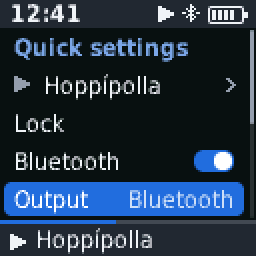
- While something plays and you are not on Now Playing, the bottom row is a small player showing the title.
- Hold Back from anywhere to get Home. Hold Menu from anywhere for Quick settings: Now Playing, Lock, Bluetooth on/off, Output and more.
- Destructive actions (factory reset) ask first, with the safe answer highlighted.
Home
Home is a grid of app icons. Up, Down, Prev and Next move the highlight; OK opens the app. The bottom row names the highlighted app, or shows the small player while music plays. Settings › Display › Home screen chooses which apps appear.
Screen off and lock
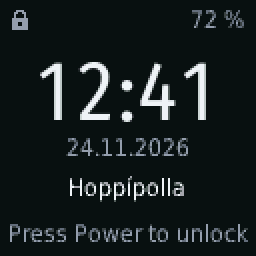
Press Power to switch the screen off and lock the keys; music keeps playing and the volume keys still work. Press any key to see the lock screen (clock, date, track, battery) and Power to unlock.
Power menu
Hold Power for 1.5 s: Power off, Sleep timer, Lock keys, Restart, and under it two entries for the curious: Start original firmware and Recovery mode. Start original firmware does nothing useful on a player with the current layout (the original firmware is no longer there). Recovery mode restarts into the chip's USB recovery mode, used by the install tools (troubleshooting).
Holding Power for 4 s switches the player off without the menu. To switch it on again, hold Power for about a second or plug in USB.