
Orpheus manual
Orpheus is a replacement firmware for the Yoton YM03 MP3 player. This manual describes what it does today; parts that are still being built are marked in progress. The day-to-day log of the work is STATUS.md.
Getting started
- Install, update and restore: putting Orpheus on the player, updating it, and going back to the original firmware.
- Keys: the ten keys mean the same thing on every screen.
Apps
Home shows the apps that work on the player:
| App | Page | What works |
|---|---|---|
| Music | music.md | Folders, library by artist/album/genre, queue, shuffle, resume, bookmarks |
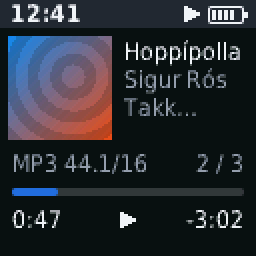
| Now Playing | now-playing.md | MP3, FLAC, WAV, Ogg Vorbis, Opus, Speex; album art |
| Files | files.md | Browse, sort, play, read text files |
| Pictures | pictures.md | JPEG, PNG, BMP, QOI viewer and slideshow |
| Bluetooth | bluetooth.md | Send music to Bluetooth headphones or a speaker |
| Settings | settings.md | Sound, playback, display, language, storage, system |
| Performance | performance.md | Normal or Maximum processor speed |
| USB Drive | usb-drive.md | In progress: start a computer from an ISO or disk image on the card |
Radio, Recorder, Steps, Stopwatch, Authenticator and the Bluetooth presenter remote are planned; they are not on the player yet. The screenshots come from the simulator, which shows every planned app on Home.
When something goes wrong
- Troubleshooting and recovery: the player does not start, restarts by itself, or you want the original firmware back.
- FAQ