
Music
Music finds your songs on the microSD card two ways: by folder (works at once) and through a library of artists, albums and genres that the player builds in the background.
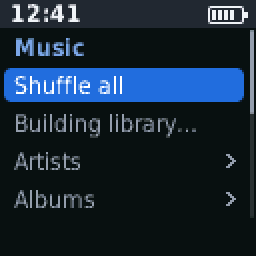
The list
| Entry | What it does |
|---|---|
| Now Playing | Back to the playing track (only while there is a queue) |
| Resume "title" | Continue where you stopped, after switching off |
| Shuffle all | Plays up to 256 songs from the whole card in random order |
| Artists, Albums, Songs, Genres | The library (below) |
| Recently added | Songs by the date they arrived on the card |
| Folders | The card's folders, music files only |
| Bookmarks | Places you saved in long files |
OK on a song plays it, and the list it is in becomes the queue (the rest of the album or folder, in list order). OK on an artist, album or folder opens it. Menu on any of them: Play, Shuffle, Play next, Add to queue (up to 256 songs).
The library
The first time the player sees a card (or after you add music) it reads the tags of every file while you use it; until it is done the library entries show "Building library…" and Folders and Shuffle all still work. On a card with about 5,700 files the first build took about 11 minutes; later builds only read what changed. Settings › Storage › Rebuild library starts over.
Files without tags show up as "Unknown artist", and albums take the folder
name. The library is kept on the card in /.orpheus/; nothing else on the
card is changed.
Playing
- Formats: MP3, FLAC, WAV, Ogg Vorbis, Opus and Speex. AAC, ALAC, WavPack and APE are in progress.
- Gapless: consecutive tracks join without a gap. MP3 joins are clean; the first FLAC join after a queue starts can tick (known issue).
- Resume: the player remembers the queue and the position when it is switched off.
- Shuffle and repeat: Settings › Playback, or Menu on Now Playing.
- A–B repeat and the sleep timer: Menu on Now Playing.
- Browsing while music plays does not interrupt it (measured: no dropouts while scrolling a large folder during 48 kHz MP3 playback).
What the player shows while playing is on Now Playing.
Not yet
In progress: playlists (.m3u), Favourites, fades on pause and skip,
playback speed.